GUID Fix When Copying and Pasting SSIS Packages

In a previous post I discussed how to create and use SSIS templates. One issue that can arise when doing this is that duplicated GUIDs will be assigned to each copied package. This creates identification issues if you utilize SSIS logging.

There are three simple solutions to solve this problem:

1. Manually select the generate new GUID option in the ID drop down box in your package properties.

2. Right click the package name and choose the option to reset all GUIDs within the project. This requires the BIDS Helper add on.

3. Rename your package and a new GUID will be automatically generated.

Is Yelling in a Meeting Productive?

A long long time ago in a place far far away…I’m in a meeting. There is a crucial issue that has been exposed in a highly visible project that I am a part of. What is going through my head you ask? I’m not thinking about the project or how I might contribute a solution to the issues at hand, I’m seriously contemplating walking out of the meeting. Why you ask? Because I am listening to the manager loudly yell accusations at others as he repeatedly slams his fist on the table. “I’m tired of this $%#&, this needs to get solved NOW!”

So I, like many others present, avert my attention elsewhere attempting to ignore this overly emotional and unprofessional display of frustration. Just based on this natural reaction that I had yelling has already proven to be counterproductive. I’m not coming up with brilliant solutions on “how to solve the problem now” I’m zoning out and wondering how this individual can possibly think his display is appropriate. Perhaps he is under the impression that to be heard one must behave this way. I think he is sadly mistaken. I strongly believe that an intelligent person is able to effectively communicate and inspire others by encouraging communication in a respectful manner.

Solving problems and getting things done requires motivation. Correct me if I’m wrong, but I suspect that it is a rare individual that would list “being yelled at” as a strong motivator. In the situation that I describe here the team became motivated when a clear project plan and team structure was laid out by another meeting attendee. The yelling had absolutely no positive effect on the outcome of the meeting and really only served as a waste of time for everyone else.

So, if my opinion isn’t already obvious, yelling is absolutely unproductive in meetings. It is unprofessional, demotivating, and in many cases abusive. We, as humans, are simply not wired to respond positively to being yelled at. If you find yourself in this type of meeting I recommend avoiding responding with the same ridiculous behavior. If the situation is extreme you should have the courage to stand up and remove yourself from the situation. It is possible to get reprimanded for doing so, but I personally would rather take the chance and potentially gain respect for standing up for myself tactfully.


Pros and Cons of SSIS Templates

My previous post covered how to create and use a SQL Server Integration Services (SSIS) template. Now you might be wondering why would I use these templates and what are the dangers of using them?

The Rain (cons): SSIS templates need to be downloaded to every local machine that you will be developing on and, as addressed in my previous post, it must be stored in the assigned template folder that was chosen in your SSIS install.  I recommend saving the original template on a shared network drive to allow for easy access. Also, when you are using your template for a new package you must generate a new GUID, otherwise SQL Server will be unable to differentiate between your new package and other packages with this same GUID.

In my opinion the most dangerous aspect of using SSIS templates is the potential for losing consistency. It is inevitable that your template will require alterations before the completion of a project. In this event you would of course save the altered template on the share drive and instruct your team members to download the new template and update their local copies. Some team members may fail to do this (maybe they are on vacation, or the timing is inconvenient) and continue developing on the old template. As the project manager your perception is that all packages are consistent, but as the project comes together some missing pieces may come to light.

This scenario results in inefficiency due to extra work and package validation – and of course frustration from all angles.

The Rainbow (Pros): Standardization is extremely important in IT projects because (as we all know) the project will continue to grow – Instead of “scope creep” should we say “scope sprint”? Consistency of design helps keep the project extensible and easier to maintain. In addition, if a key team member gets hit by a bus, standardized designs will be easier to document and communicate when other team members need to be trained.

Other than standardization, SSIS templates are highly efficient. Once the initial template is created your developers will be able to start with a package that already has standardized logging mechanisms, control flow tools, and indirect package configurations. As a developer of SSIS packages I’m sure it is clear how much time would be saved if you didn’t have to set these components up with each new package you create.

The Pot of Gold (overcoming the cons): You have the option of taking a precautionary step using a Team Foundation Server (TFS). Your lead developer can utilize TFS source code control and set team standards for downloading updated templates. This product offers the capability to track old versions of the template while allowing a developer to “check out” the package for editing and saving.

This additional step in utilizing templates has the potential to save you and your team from a lot of headaches. Keep in mind that using the TFS product will not solve the problem is team standards are not set and adhered to.

Thanks for reading; I hope this has been insightful. Have a great day!

How to Create and Use SSIS Templates

SQL Server Integration Services templates can be a great time saver when creating multiple ETL packages for your business intelligence solution. In this video I will demonstrate how to create and use these templates.

First you will start a new project. Open SQL Server Business Development Studio, navigate to File > New > Project.

A New Project window will open. Navigate to Business Intelligence Projects > Integration Services Project, name your project and select OK. The name of your project should correspond to your intended use of the template.

Next you will build your template by adding the items from the toolbox that you wish to include. These should be items that will be needed for each use of the template.

You will  now need to save your project in two different ways. First click File > Save Selected Items. Next click File > Save Copy of “project name” As. A Save Copy of Package dialog box will open. Select File System in the Package location box and navigate to the Package Path field. You will want to save your package in this location: (assuming that you have installed SSIS with default settings) C:\Program Files\Microsoft Visual Studio 9.0\Common7\IDE\PrivateAssemblies\ProjectItems\DataTransformationProject\DataTransformationItems\Template Tutorial.dtsx

Now you will be able to access and use your SSIS template. Open a new SSIS project and navigate to the solution explorer pane. Right click on the project and select Add > New Item. This will pop up a box that allows you to select your newly created SSIS template and add it to your package.

There are many great benefits to using SSIS templates as well as some dangers. I will explore each of these areas in my next post. I hope this has been helpful, have a great day!


Accepting Project Failure

Project managers will shudder at the thought of this phrase, but sometimes accepting failure and moving on is the best choice. PMs will hesitate considering their personal reputation, the reputation of the IT team, job security, and sunk costs.

As projects begin to slip past deadlines and go over budget those involved sense the risks that are accumulating. As this continues and executive demands increase it becomes more apparent that the project is in serious trouble. Systems are not seamlessly flowing, technical implementations are not working, and the roles of the project team members are becoming fuzzy. When is it time to pull the plug?

Hind sight is 20/20 as they say and at this point you and your team are probably seeing a much more viable solution than the project that you have currently under taken. It’s time to take out your ROI and risk assessment calculators.  Also it’s a good idea to review any contracts that you may have signed with vendors for this project.

Consider this: How much have you already spent versus how much more will it likely cost to complete this project? Obviously the original time estimates were inaccurate so try to use more realistic estimates based on the pace of the project so far.

Can you get out of your vendor contracts?

How much will an alternate solution cost? Remember REALISTIC estimates here.

Is it possible to get the project back on track?

There are hundreds of books that outline the reasons why IT projects fail. Use some resources to pinpoint what may have happened in this project to determine if you should call it quits or attempt to remedy the situation.

In the end, if the project is a failure you have to accept it, deal with this reality, and learn from your mistakes. It may be a good idea to revamp your project team and find an experienced PM mentor to help plan for round 2. This will be your opportunity for redemption where you will be able to plan and manage the project in a way that increases the chances for success.

Dimensional Modeling

When designing your business intelligence solution your data model should coincide with the way that your business analysts interpret your business structure. Now, the goal here is to hide the complex technicalities. You’ll do this by creating an OLAP model that allows your analysts to create intuitive structured queries. In short, your analysts should be able to query your data warehouse in the same way that they would ask business questions.

Business Intelligence is used to measure aggregations (which are facts) across dimensions. This is the ideal modeling used in the BI environment. The dimensional model is designed using specific business process areas. You may decide to track sales amount as a fact using dimensions such as product or store number or sales date to give meaning to those facts.

Measures or facts are numeric data that corresponds to the questions that your analysts are asking. Facts can point to a record in a dimension table that will give meaning to the data. Common facts include dollar values, sales, and revenue.

Dimensions create the anchor when investigating a fact. An analyst may wish to view sales on a specific date for a specific group of customers. This would require the analyst to create a query that links the Sales fact table with the customer and date dimensions. Without this ability the facts would simply be unstructured facts. The Date and customer dimension allow for filtering, grouping, and labeling to narrow down query results.

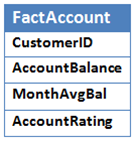
This example of a fact table displays how the measures of a customer account are tied to the customer dimension. Each measure will have its own aggregation rule such as sum, average, min, or max. The aggregation rules are defined by the ways the business chooses to compare the values of the measure. In this example I display a monthly average balance attribute. Your business may be interested in a yearly average rather than monthly. In addition, the account rating attribute will be calculated using the pre defined business rules for determining an account rating. It is important that these rules are clearly defined and communicated to your analysts so that the true meaning of the data is understood.

This example of a dimension table displays the details of a customer. It includes attributes that describe business interests about the customer. The customer dimension will tie to multiple fact tables to provide a clear image into the details of customer interactions with the company. For example, the CustomerID shown above clearly links to the FactAccount table shown above.

Dimensional hierarchies define a set of parent-child relationships between attributes within a dimensions. A dimension hierarchy includes levels that can roll up from child to parent. A dimension can have more than one hierarchy. The date dimension example shown can include multiple hierarchies such as “Day > Month > Year”, “Day > Week > Year”, “Day > Month > Quarter > Year”, etc. The specific hierarchies that you will include depend on your internal business needs.

I hope this has been a helpful explanation of dimensional modeling. Have a great day!

Exactly what is a Slowly Changing Dimension (SCD)?

Just the sound of the phrase “slowly changing dimension“ can sound quite intimidating when uttered in a technical meeting, but you might be shocked at how simple this concept really is. In fact, it has nothing to do with shifts or alterations in the universe at all. J

If you are involved in data warehousing you should have a firm grasp of SCDs as they will be necessary to structure your data in a meaningful way that takes advantage of the capabilities of a data warehouse; specifically when you wish to store historical data rather than simply overwriting a record. So, let’s break it down:

Slowly Changing Dimensions: Dimensions in your DW that include attributes that will gradually change over a period of time.

There are three types:

Type I – Overwrite old values: The old record is completely over written by the new record. Type I is used when you have no desire to store the historical attributes of the record.

Type II – Create an additional record: The old record will be kept and a new record will be inserted. Type II is used when you wish to store the historical attributes of the record.

Type III – Create new fields: This type creates new fields in the record to maintain the history and the current values of the specific attributes in the record.

Below are examples of how to use each type. In this example the price of a product is changing.

Type I: The old values are over written

Product price in 2011

Product price in 2012

Type II: A new record is created.

Product price in 2011

Product price in 2012

As you can see in the above example there are a few problems with the structure of the table. When using a type II SCD you will need to add a couple of basic fields to effectively track the historical records. There are several possibilities, but the idea is to be able to differentiate between the two records. Also you may notice that there are two identical IDs for this record. That is OK. This is still the same product so a common identifier is necessary. We will be able to narrow down our selection criteria by choosing the active record. A more realistic type II record would look like the below.

Product price in 2012

Type III: New fields are inserted

Product price in 2011

Product price in 2012

There are many scenarios in business where each of these SCD types will be useful. The most common are types I and II because type III can only store a limited amount of historical data.

I hope that this explanation has helped to simplify your understanding of how to use slowly changing dimensions in data warehousing.

Looking for BI Talent? Questions to ask a potential BI Analyst

A Business Intelligence Analyst position requires a wide range of technical knowledge and problem solving skills as well as a personality that can fit well in both IT and business analytical environments. Many IT centered people prefer to keep to themselves and focus on programming. This type of personality, while valued, will likely not fit well in a BI Analyst position. On the flip side, someone with loads of personal skills who is lacking in technical comprehension will simply not fit the bill.

What you are looking for is the perfect balance between IT and business, which really can’t be judged by reading an applicant’s resume. Resumes can often be misleading. They are full of recommendations, certifications, and include a long list of skills that just so happen to match the job description exactly.

Below I have listed a few questions that might help you gauge the competency of your BI Analyst applicant, starting with basic comprehension of a BI solution.

What is a BI solution used for?

This is a good starting question that a qualified applicant should be able to easily tackle. They will have the opportunity to present their perspectives on what a BI solution actually is and their answer will reveal whether or not they see the same potential value in BI as you do. Ultimately you are listening for the key words “better decision making.”

Walk me through the flow of data in a BI solution starting with the source system.

This question will test to see if the applicant understands the data flow from the technical perspective all the way through to the presentation level. An acceptable answer can be as simple as: Source -> ETL -> Data Staging -> ETL -> Data Warehouse -> Dashboards.

How would you approach analyzing a report with bad data?

This will provide some discovery into the applicant’s thought processes and problem solving skills. You should expect to hear that the applicant would question the integrity of the report as well as the integrity of the data in the data warehouse and the source system. From there the applicant should be able to walk through his or her plan for correcting the issue.

What steps would you take when building a data warehouse?

This will be the beginning of evaluating the applicant’s technical knowledge. The applicant should understand the importance of communicating with users and gathering business requirements. The applicant should also display an understanding of how to design the data warehouse schema and plan for the structure of the upcoming fact and dimension tables.

From here you will want to move into more technical questions. The specific questions will greatly depend on the specific software that you use. You will want to ensure that there is an understanding of the different components of an ETL package. It is also important to test the applicant’s understanding of how security should best be organized and utilized in reporting services and dashboards.

It is a good idea to push the applicant to the edges of his or her knowledge. At some point you will reach a question that the applicant doesn’t know. In this case “I don’t know” is an acceptable answer. What is less appealing is when the applicant obviously doesn’t know the answer but attempts to bull shit and ramble while avoiding a direct answer. A confident and intelligent person is comfortable to admit when he doesn’t know something, so you should view this as a positive in communication skills.

I hope that this has been a valuable resource for you and that it might jump start some ideas when interviewing your BI Analyst applicant. Happy hunting!

 

Mobile BI

Source: Glenn Fleishman

From paper to desktops to laptops and now tablets; business intelligence is evolving. Business decisions can now be made from a plane, a bus, or while you’re lounging on the beach sipping a Mai Tai. We are no longer limited to the confines of our office when an imminent decision must be made.

Mobile BI offers us all of the advantages of our desktop applications with the added option of pulling location specific data. Are you traveling for business and you only want to view the BI data that is relevant to your location? Tablets are equipped with GPS devices that will allow your BI application to determine your coordination and pull data that is geographically relevant.

Mobile BI is not just for data extraction, but data collection too! A great example lies on the gaming floors of casinos where hosts have been armed with iPads. Gamers are able to avoid long lines by meeting directly with a host who can use the tablet to gather the customer’s information and book a hotel room, sign up for a player’s club card, or even make reservations at the casino’s sushi restaurant. This concept makes marketers ecstatic while in turn attending to customers’ needs more efficiently.

Privacy and security concerns lurk in the background as companies edge into the mobile BI sector. Is the company tracking too much information about the actions of the employee while using the tablet? What policies should be put into place about the rights of employers and employees? And the most popular concern is the idea of company data floating around outside of the company’s firewalls. These are all considerations, but certainly not road blocks when deciding to empower your company with mobile BI capabilities.

Overall, easier access to data means we can accomplish more from nearly anywhere in the world. There is less waiting and more doing as decisions are easily made on-the-go. The future will bring many more mobile solutions with features that will allow us to do much more than view data, but manipulate it as well.


Where does SQL belong in your BI solution?

Well, in my opinion, it definitely belongs somewhere. SQL is a powerful querying language that empowers tech-savvy users to create large data sets with just a few simple commands. Regardless of how robust your BI solution is, SQL querying will never go away. Many BI vendors’ major selling point is the simplicity of report creation through drag and drop interfaces. Users will never have to see the code being generated because of the wonderful and visually appealing user interface.

So, what if your analysts are already accustomed to accessing your data warehouse through SQL? It just isn’t feasible to expect them to drop this tool of empowerment and move straight into creating ad-hoc reports using only your new business intelligence software. It is obvious why, who doesn’t want to run a “select * “ statement occasionally? J

Herein lays the fear: What if the analysts never migrate to the new BI tools? What if interactive dashboards and web driven reports are never created? What happens if reports continue to be emailed as attachments? While these are all valid concerns, you will need to step back and gain some perspective (and patience).

As the BI Administrator you have likely had a large role in the development of the data warehouse. You are familiar with the tables, the joins, and the meaning of the data. By the time your BI solution goes live you are likely excited to see the true potential of the tools revealed, so a few days later you might ask: Where are all those pretty dashboards? What you have to realize is that you are way ahead of the pack on this one. (It’s lonely huh?)

Other analysts will need time to adjust to and experience the new organization of your company’s data. If they are used to querying through SQL then it is a great idea to set them up with access to the new data warehouse using a familiar tool. There will be some period of training where the analysts will learn the capabilities of the new BI tools and they will begin to make connections between the data and the possible displays that can be created.

Continue to be patient and you will likely see user adoption increasing, after all, the analysts are probably responsible for helping to realize that great ROI that was calculated before investing in a BI solution so they want to see it succeed  as much as you do!

