BI & Collaborative Decision Making (CDM) Software: A Happy Couple

Business intelligence provides businesses the opportunity to analyze massive amounts of data in relatively simple formats. The obvious goal when companies deploy a business intelligence solution is to achieve a high ROI by streamlining business processes through the analysis of the presented data. Unfortunately many organizations may be missing out on their ROI by failing to follow through with the decision making processes that should follow the analysis of the data.

Collaborative decision making software may help bridge the gap by keeping the data analytics and the decision making process linked. With CDM software multiple people in the organization will have the ability to collaborate on the displayed data and converse about the interpretation of it. CDM will avoid the scenario where a colleague calls a meeting and presents his findings to a group of decision makers. Rather than isolated analysis of the data, group interaction will occur which has the potential to generate more ideas and creative ways to take action based on the displayed results of the data. In addition, this type of interactive collaboration makes it possible to pull in other parties, who might add valuable insight, nearly instantly.

CDM software is also self-documenting. There will be no need to take notes and write documents (this hardly ever happens anyway) that record the results of a meeting or discussion. All parties involved in the decision making process will be held accountable and this will avoid the scenario that may occur after a decision is made…”Why did we decide to do that again?”

CDM software is rapidly growing in popularity and is now often included as a standard feature in a business intelligence solution package. When choosing your BI software be sure to consider if CDM platform will add value to your organization. If you already have your BI solution in place it may be a good idea to ask if there is an add-on solution for BI collaboration.
 

Correcting Data Mistakes in Your Data Warehouse

Your analysts found some data that doesn’t quite look right in your data warehouse and ask you to investigate. You look into the data in more detail and find that the data is indeed incorrect. This is quite alarming since analysts and executives have been making business decisions based on this flawed data. In addition, as the data warehouse administrator you probably take a lot of pride in providing users with quality and reliable data. It is undesirable to run the risk of losing user confidence in the data. Now it is time to dissect the ETL process and determine what went wrong, but where to begin?

  1. Address the issue – It is important that you inform the people accessing this data that it is incorrect. Any analysis or decision making processes that use the bad data should be discontinued until the data is corrected.
  2. Reverse engineer – This will be much easier if you were the architect who designed the data warehouse. It will also be a simple process if detailed documentation exists for your data warehouse. Unfortunately this might not be the scenario you are facing.You will first need to trace the data back to your data staging area by reviewing the ETL package that moves data from data staging to the data warehouse.

    From there you will need to review the ETL process that moves data from your source systems into your data staging area.

    The next step will require you to review your source system data.

  3. Now ask questions – The next step is to analyze what you have found in your reverse engineering process.Is the source system data wrong? If this is the case you may need to investigate the possibility of data entry mistakes by users, or bugs in the source system. Have any updates or enhancements been made to the source system that could cause this error?

    If the source system appears to be correct then you can conclude that the issue lies somewhere in the data warehouse build. Is your data staging area correct? In most cases your data staging area will be straight data pulls from the source system without any major data transformations, but this possibility should still be investigated.

    Finally the last step, and the most complicated, is to begin sifting through the intricate ETL package and data quality process that populates your data warehouse. Hopefully this is where you will find your ETL error. If this investigation is unsuccessful however you may want to consider other external processes that alter your data warehouse. For example, is there a scheduled job that runs separately from the initial data warehouse build?

  4. How far back does the bad data exist? – If the bad data only started appearing in recent months or days then you should investigate what changed that may have caused this unexpected change. If the data has always been incorrect you can assume that the data warehouse architect simply made a mistake.
  5. Correct or move forward? – Depending on the type of data and the extent of the damage you may opt to correct the historical data or it may be more efficient to correct the data for the future and chalk the old data up to a lost cause. If you choose to only correct the data moving forward then I suggest truncating the field so that future analysis will not include the bad data.

If you are facing the task of debugging your data warehouse I hope that this has been helpful. It can be an overwhelming task (especially when others are not exactly happy) but take a deep breath and just begin the process while focusing on one step at a time.

What is SharePoint? A simple answer to a complex question.

In this video I will simplify the components of the SharePoint platform. Many people view SharePoint as a single product, but as I will demonstrate, it is actually a platform that supports multiple products and functionalities.

The capabilities of SharePoint go far beyond what I have outlined in the video. My goal is to help you to compartmentalize the complexity of the tool so that as you learn more about its’ capabilities you will be able to separate functionality into the six categories of products that SharePoint offers.

I hope this video is beneficial and helpful in your business intelligence research.

BI Software as a Service (SaaS)

The majority of business software applications are still installed locally on desktops. Administrators will have tools for ETL and data quality processes while developers will have tools for managing reports and building dashboards. The software required for each of these processes is typically very expensive and also designed for big data companies. These characteristics often make business intelligence less accessible for small or medium sized companies.

A realistic solution for smaller companies to consider is BI software as a service, also known as on-demand BI or cloud BI. SaaS is offered by vendors on a pay as you go plan rather than purchasing an annual license. Companies like Panorama  and GoodData  are now offering cloud hosted BI software as a cost effective solution for smaller businesses. Your company may already be using other cloud based applications. If this is the case then you already know that this alternative requires far less investment with minimal up-front costs. An additional cost saving factor is that SaaS does not require an on-site administrator to maintain software, which will save your company in labor costs.

There are several implications to consider when choosing SaaS BI for your business. A concern for many managers is that hosting data on the cloud means that secure data will be sent outside the company firewall. BI SaaS is sometimes a simplified version of traditional BI software. This means that functionality may be limited or features may be difficult to use. SaaS is often less scalable and BI SaaS may not be able to grow with your company if your data needs change drastically.

It is common for companies to offer free online demos of their BI SaaS. I recommend taking a test drive with the software before making a decision. It would be most beneficial for you to upload some of your actual data and conduct a trial data analysis using the software. You may find that BI SaaS meets all of your data needs, or you may wish to pursue a more traditional BI approach.

Scope Creep

Changing business intelligence requirements is a normal part of doing business in a fast paced environment. It isn’t uncommon for business processes to evolve during the implementation of your business intelligence solution. The question isn’t how to handle the project if the requirements change, it’s how to handle the project when the requirements change.

The best approach in these situations really depends on the extent of the change that needs to be implemented and the completion percentage of your data warehouse. During the beginning stages of your project it will be fairly reasonable to pull in additional fields from your source systems, however, if you are nearing the completion of your business intelligence solution requests for additional data should be postponed until the system is fully functional.

Data quality processes will generally be one of the final stages of your business intelligence solution. During this time period it is common to experience some definition changes as to how your data should be cleaned up and organized. Small enhancements such as changing the hierarchy of cleansed records will be a nuisance but feasible at this stage.

Obviously changing any requirements midway through the project is a very undesirable situation, but unfortunately this scenario is sometimes unavoidable. Managing scope creep will be a very involved process from the beginning stages of your project until completion. You won’t be able to “rule with an iron fist” because some changes will need to be made, but you will be able to actively manage the users’ expectations by keeping them informed on the limitations of changes and by working with your vendors to determine which types of changes are acceptable and which ones are not.

Vacations: Good for you, Great for your Organization

We all know them, they are at the office in the wee hours of the morning and the last ones to leave in the evening. They are usually extremely productive and are viewed as extremely dedicated to their work. They sacrifice their vacation time because there is simply too much to get done. They’ve sometimes earned the title of “workaholic.” What many of us often overlook is that putting in these extremely long hours without taking the time to rejuvenate may actually be harming our team more than it is helping.

Working in the IT industry, like many other professions, requires long hours of continual focus and concentration. We are challenged with solving complex technical and non-technical issues on a daily basis. We manage multiple projects and deal with dozens of team members, vendors, and executives simultaneously. This fast-paced and highly demanding work environment will eventually take its toll on you if you do not schedule time to separate yourself from your work and rejuvenate.

Here are a few of the many benefits of taking regular vacations:

Get a new perspective: You may have heard analogies of being “too close to the project” to see the solution clearly. Sometimes when we take a break from our projects we will return with a fresh perspective and keener problem solving skills.

Reduce stress: Most of us know that when we are stressed out we make poor decisions. Taking a breather will allow us to unwind and relax. With a relaxed mind and body we will be able to think more clearly and handle difficult situations with a level head.

Improve health: If you find yourself taking more sick days than usual this may simply be your body telling you that it needs a break. A vacation will allot you the opportunity to get more sleep, exercise, and pay more attention to your diet. A rushed lifestyle may lead us to become sleep deprived, eat fast food, and to be sluggish as we sit at our desk all day.

These are just a few of the many benefits of taking some time away from work. Turn off the cell phone and avoid checking your email for a few days and you will be rewarding yourself and your coworkers in the long run.


Dump Your Dead Weight Customers

Most companies spend the majority of their BI and analytical efforts designing marketing campaigns to specifically attract new customers. It is probably less common to look for the dead weight customers that may be responsible for more headaches than profit. With the high costs of marketing and advertising, a smart strategy is to focus on the quality of the customers rather than the quantity.

So how do you spot these dead weight customers? Of course, the type of relevant data that you have depends on your specific industry, but here are a few ideas to get the wheels turning:

Customer Service Calls – A big spender who complains a lot may be costing you more than he is worth. Each minute that your operators spend on customer service calls represent a decreased value in your customer. A good way to get a more accurate value of your customer is to consider both the costs incurred via customer calls as well as the amount that they spend.

Returns/Refunds – Returns will usually always result in the company taking a monetary hit in one way or another. There may be additional restocking fees or shipping and handling fees involved. In addition, returns take time to process which adds additional costs to the transaction. A customer may be a big spender and you may have valuated him as someone you will strive to retain, but it is important to also pay attention to the amount of returns or refunds the customer requests. Use the variables that are specific to your data set and determine the cost that is incurred for a return transaction and use this figure to determine a more accurate value of your customer.

Offer vs. Spending Ratio – Consider the marketing offers that you send out, are they bringing in a high yield? One clothing store that is located in my neighborhood sends me coupons for $10 off of any purchase. They are essentially giving me $10 for free. The goal of this offer is of course to get me in the store at which time I will likely spend five to ten times this amount. If I were to take this $10 coupon each time and spend exactly $10 in the store then the retail outlet would be smart to consider me a dead weight customer and discontinue sending me these offers.

I have presented a very simplistic view to encourage you to consider the different variables that can devalue a customer. It is important to also consider the other non-monetary valuations that can be placed on your customers such as referrals and influence. Just as in the above examples, you can put a value on these variables and continue to build the formula that you will ultimately use to put a true value on your customers.

Data Quality Assurance – Will the Real John Smith Please Stand Up?

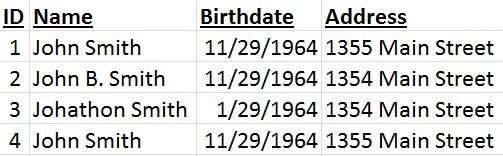
As humans we have the ability to scan multiple segments of data and make logical conclusions about the relationships that records have with each other. As an example, if we see the four records below we can easily conclude that all four records are indeed the same person.

Data Quality Assurance

Data quality assurance is the process of cleansing or scrubbing your data as it is extracted from your source systems and before it is inserted into your data warehouse. The ultimate goal is to remove “dirty” data such as duplicate or incomplete records. Multiple tools can and should be used to ensure that your data warehouse is as accurate and clean as possible.

If you data includes addresses you may choose to cross reference the city or province with the zip code or postal code. Many companies sell databases that include updated address information that can be used as a standard comparison for your address data.

Fuzzy logic can be used to merge duplicated records like the ones that appear in the example above. We can see that records one and four are a 100% match, so these can be easily merged. When comparing records one and two we see that two includes a middle initial and has an address discrepancy.

This is where your business rules will come into play. You may decide to disregard middle initials in your data cleansing process, or you may consider that the name field is one letter off and deduct 5% from the data match. Seeing that the address is one number off may also deduct the match score by another 5%. So the data quality score for records one and two comes to 90%. You will need to set your threshold to determine your business rules for merging two records. If your threshold is at 85% then these two records will be merged.

Now the question is to consider which record has the accurate data. This example is relatively simplistic because we do have two identical records. It is probably safe to say that the two 100% matching records have the most valid data. We can also look to see that the same birthday appears three out of four times, so we can safely conclude that the correct birthdate is 11/29/1964.

Data quality assurance is one of the most important things that will be used to construct your data warehouse and you shouldn’t underestimate the importance of investing both time and money into this portion of developing your business intelligence solution.

Protect Your Users: Say NO to Information Overload

Say No to Information Overload, Business IntelligenceAs a person driven by the joy of dealing with massive amounts of data, you can likely view tons of data without feeling overwhelmed. But, when designing BI dashboards remember, most users aren’t like you. I’m not saying this is a bad thing, what would the world be like if it were filled with data geeks? -Eeek. To help users make sense of the massive amount of data that you will be displaying I recommend organizing a single page dashboard with data organized into meaningful groups.

If more information is needed you can hyperlink each group title and present the user with a fresh one-page view that is specific to the particular group. Too many graphs, charts, and KPIs will simply begin to blur and the user may actually feel less informed after becoming overwhelmed with too much data.

In addition, I recommend paying attention to the level of detail that is displayed on your dashboards. If your user’s home dashboard is littered with detailed information they may end up spending a lot of time trying to figure out which data sets are relevant to their questions. Save the home dashboard for summary data that allows the user to drill down into more detail if needed.

You may also want to consider what level of detail to display when the user does wish to drill down on a report. I have found that allowing for three layers of drill down display provides a good balance. The user can navigate from summary, to aggregated, to individual record detail at will.

One final point I would like to make when considering the potential for information overload is to thoughtfully organize your user’s dashboards. Rather than simply squeezing in charts wherever they will fit engineer your dashboards to help the user find the most vital information easily. Most users’ eyes will naturally begin reading at the upper left hand corner of the screen, so naturally it would be a good idea to place their most coveted information in this area. Other less relevant data should be placed at the lower left hand corner of the screen, while keeping in mind the importance of arranging data in a meaningful way that allows the user’s mind to easily move from topic to topic.

Best of luck in your dashboard creation ventures! I hope this has added value for you.

How to Market Your BI Tools Internally

If you’re in the middle of implementing your business intelligence solution and you haven’t yet considered user adoption strategies, it’s time to start thinking about it. We usually think of the term “marketing” to mean collecting data about our customers to find methods that will increase sales.

 In this scenario replace the word “customers” with the word “users”, and replace the word “sales” with the words “user adoption”. It’s time to learn about your users so that you can effectively promote your new business intelligence solution to increase user adoption.

When we market we learn about our customers/users through effective communication. This is accomplished by marketing campaigns, or in this scenario a communication strategy. As hard as it may be for you admit, your BI tools may not be meant for every user. Communicate with your users to learn about their needs and how they currently accomplish their daily tasks. Here are some questions to help determine a user’s needs:

  • Will the user need to compare historical data?
  • Does the user run the same reports on scheduled days/times?
  • Is the user an analyst who will need to see the data in more detail?
  • Is the user only interested in summarized data?

Once you have communicated with your users and collected information about their needs you can begin to access how the BI tool can help to make their jobs easier and more efficient.

The need for communication continues by establishing a training plan for your users. I recommend training each user on the portion of the BI tool that will benefit them the most and the fastest. If you can spend five minutes to show a user how his report can now be updated automatically and save him three hours a week he will see the instant value in the new BI solution.

This could be compared with the phrase “go for the quick win”. Creating instant value for your users will win them over and make them curious about what else the BI tools can do for them. To accomplish this training is essential. Don’t promise your users that the tool can do what they need, but leave them to figure it out for them. They will easily become frustrated and revert back to their old methods that work well enough for them.