Validating Your New Data Warehouse

The task of validating a new data warehouse is a necessary evil. It’s tedious and time-consuming, but if done properly it will result in a stable and robust data warehouse that is the basis for your business intelligence solution. Here are a few things to consider when taking on the task of validating a new data warehouse:

1. What data sources are driving the creation of your new data warehouse? You will likely have multiple source systems such as a point-of-sale system, a human resources/payroll system, an inventory system, or other industry-specific systems that will be included in your data warehouse. In many cases you will also have your current/old data warehouse and a data-staging database, or a reporting database. You may choose to pull history data from the latter sources if your main source systems clear data that is older than x number of days. This is what I experienced when working with a source system that lets data fall off after two months. The needed data was already archived in the current data warehouse, so those records were brought into the new data warehouse once and new records were added directly from the source system.

2. Do these source systems have data integrity issues or other areas of weakness? The opportunity to build a new data warehouse includes the opportunity to clean up dirty data and fix structural and design issues that didn’t quite correlate with your business processes previously. A data quality specialist will be able to cleanse the dirty data in preparation for your new data warehouse. When it is time to compare the data in your new data warehouse be sure to consider the fields and files/tables that you know have un-clean data. If you can identify these areas ahead of time then you will be prepared to give the new data warehouse special consideration when validating these areas.

3. Who is part of your validation team? Even if contractors developed your data warehouse for you, your in-house employees should always be the ones to validate the data. In my experience the in-house team was made up of the data team and a server administrator. The data team had experience with both the old data warehouse and the source systems and the server administrator was an expert in one of the source systems. The team also involved other employees when investigating information that was job-specific to that employee.

4. We’re a team, now what do we do? There are many different ways to document the validation progress, but I have found that a simple spreadsheet will do the trick. List all of the tables in your new data warehouse and assign a team member to a table based on prior knowledge and previous experience. You should place this document on a sharing site such as SharePoint, Google docs, or even a shared network folder to allow both your data validation team and the data warehouse developers to access it. As you find data integrity issues record them on the document in the corresponding table row. Your data warehouse developers will be able to view the issues and update the item as being fixed. This back and forth correspondence will continue until all of the tables have an “approved” status.

5. Now that you have a healthy level of confidence in your data warehouse, begin writing reports from the data. This will allow you to validate more complex and aggregated data that will challenge the integrity of your data even more. I suggest duplicating reports that you know are currently being used in your company and comparing the results.

Like I said, tedious, but necessary. When you have proven the data to be accurate your users will have confidence in the data which will improve user adoption and make your job much easier in the long run.

Why Simple BI Dashboards Provide the Most Insight

http://commons.wikimedia.org/wiki/File:Scudo_dashboard.JPGWith business intelligence dashboards simplicity is key. We’ve all experienced carnival-like websites with side bars cluttered with links, advertisements, and other garbage that is just plain annoying. When we are searching the web we are seeking data and information. Clutter makes it harder for us to extract the information that we need. The same is true with dashboards.

When users view their custom dashboards, they don’t want to see data that is irrelevant to their positions. They also don’t want to see all of the data that is relevant to their positions. Steve Krug wrote a book titled “Don’t Make Me Think: A Common Sense Approach to Web Usability” that addresses the importance of simplicity when designing websites. I believe that the same concept of “Don’t make the user think” can be applied to the creation of an effective dashboard design.

When your business analysts, managers, and VPs log in to view their dashboards provide them a few broad categories that display current data that they might want to glance at to start their day. If you are like me, the first thing you do when you sit down at your desk is check your email. For dashboard users, the second action is probably to glance at their BI dashboards. The beauty of the BI dashboard design is that the users have the ability to drill-down and view details about summarized data, so there is no need to display complex aggregated data on the home page of the dashboard.

Lastly, I have to point out that you can’t guess what the users want to see on their dashboards. Don’t get overly enthused and skip the requirements gathering phase. Meet with your users before designing their dashboards to get a feel for what they would like to see. After they have had access to their dashboards for several months, follow-up with them; Are they using the data that is provided? What types of reports would they like to see? Make changes as needed to keep the dashboards up-to-date and relevant.

What is OLAP?

http://commons.wikimedia.org/wiki/File:OLAP_Cube.pngAn extremely empowering type of software that you are likely to use with your business intelligence solution is an Online Analytical Processing (OLAP) tool. OLAP is used to access multidimensional data in your database and analyze the various dimensions of the data. This is a popular technique used for trend analysis.

One of the most empowering attributes about OLAP is that there are very little technical skills required to produce high quality, accurate, and aesthetic reports. In fact, many people likely use OLAP without even knowing it. Business intelligence solutions may offer this tool and present it as a “drag-and-drop” online reporting interface. In most cases the Business Intelligence Developer will organize a relevant subset of user-specific data (much like a data mart) and the user will be able to select measures and dimensions to build meaningful multi-dimensional reports.

Drill-Down Reporting

This type of reporting allows the user to create a drill-down report which will consist of the main report hyperlinked in a way that users can “drill-down” into the details. For example, if a supply company has a list of clients who placed orders in a given week, a drill-down report would allow the user to click on the hyper-linked client name to display order details, order history, shipping details, or any other relevant detail data.

Aggregated Reporting

This type of reporting allows the user to “roll-up” data (rather than “drill-down”) that can be summed up from a particular dimension. For example, the results of a multi-division marketing campaign can be aggregated to determine the success of the campaign as a whole.

Selecting a Perspective

Reports that are created through OLAP are capable of displaying the data from multiple perspectives. Users are able to remove select sections of the reported data and view the report from a different perspective. This is highly effective when analysts are considering “what-if” scenarios.

Many people who have been in the IT industry for years might still stumble when explaining OLAP to another person. It is complicated only because of the vast possibilities that is presents, but the foundation of the concept is relatively simple: It is a browser-based reporting tool that allows for complex reporting through multidimensional analysis.

Multidimensional Analysis with OLAP

http://commons.wikimedia.org/wiki/User:RRZEiconsMultidimensional analysis uses OLAP (OnLine Analytical Processing) to organize numeric data in a clear and easy to understand format. Multidimensional reports empower decision makers by providing a more complete picture of the data and the transactions that are taking place within the company.

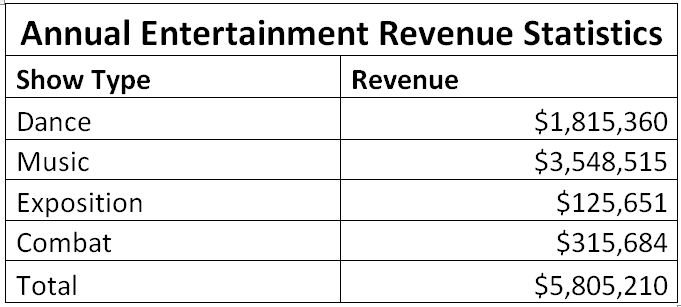
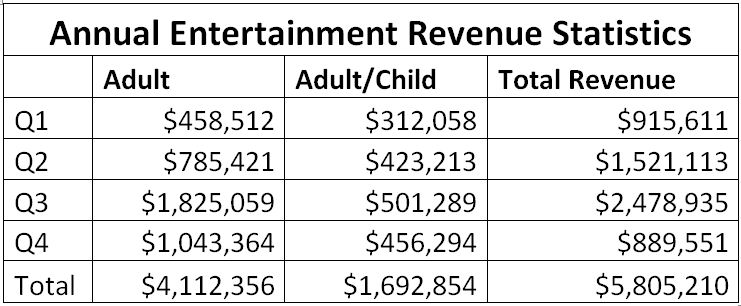
The images below demonstrate how a report can become exponentially more valuable by adding meaningful dimensions. For this example we’ll use the annual entertainment revenue for ticket sales at a local venue:

Traditional Reporting: A single dimension

Single Dimension AnalysisThis type of report gives us basic data for quarterly sales of show tickets.

Single Dimension AnalysisThis one-dimensional report provides insight into the audiences and how much revenue each segment generates.

Single Dimension AnalysisThis reports segments the shows into show types, which provides a bit more insight into which shows are bringing in the highest revenue.

While all three of these reports do have some value, they only provide the information in small portions. This is not the ideal presentation of data that will be analyzed to make marketing decisions. A better option is to use two dimensional reports:

Hybrid Reporting: Two dimensions

Two Dimensional AnalysisWhen we combine the data from tables one, two, and three we create a sort of hybrid table that can provide a more complete picture of the data.

The 3-D View: Multiple dimensions

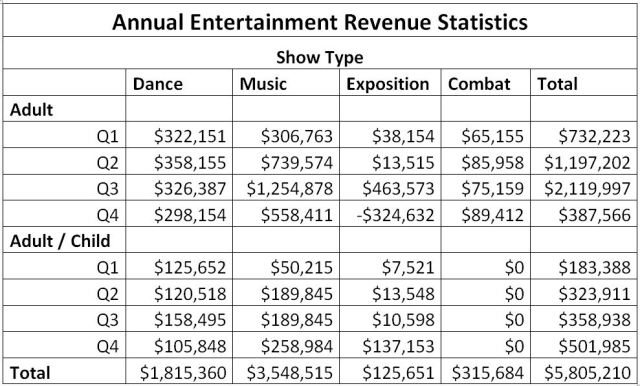
Multidimensional Analysis

This report highlights the capabilities of multidimensional analysis. It presents multipledimensions of data in a clean and easy to read format. An analysis can easily be made to determine which show types and which audiences provide the most revenue in each quarter.

When reports are designed with OLAP using multidimensional techniques your analysts become empowered and their understanding of your company data will present more of a 360 view of activities within your organization.

We Won!…I Think – How to Define Success Criteria for your BI Implementation

VictoryGuiding your business intelligence project to a successful completion requires the project to have clearly defined goals and success criteria. It may be easier to first create a simplified list of what you wish to accomplish with your business intelligence solution. List questions that you might ask after the project completion. You can then expand on these questions to create a check list type format that will put you on the road to completing a successful business intelligence implementation. Here are a few examples of questions you might ask:

Are the users empowered? / Are the users happy?

These two questions generally go hand-in-hand. When the users feel empowered, they will be happy. Hopefully you have involved the users throughout the BI project to ensure that you are including the data that they will need to excel at their jobs. Towards the end of the project the users should be trained in the areas of the BI software that they will need to use. After the project goes live, be sure to offer plenty of user support. Their first impressions of the BI tools will be lasting, and a good impression increases the chances of user adoption throughout the organization.

Is our data cleaner and easier to analyze?

If your business intelligence project did not involve migrating new data or merging multiple sources, the least you should expect is to see cleaner data that is easier to accurately query. Reports that were previously bulky and convoluted should now appear clean and easy to dissect.

Are the executives able to see value in the new BI software?

In most cases, the value that the executives perceive will be based on the dash boards that are designed for them. This is where they will see the “bottom-line” and where they will infer how much money the BI solution will save the company. In fact, the ROI produced by your business intelligence solution may be the single question that executives ask when determining if the project was a success, so it should definitely be included in your list of success criteria.

Can we better understand our customers?

In a previous post I discussed the 360 customer view. Once your data warehouse is complete your business analysts should be able to mine the data to answer behavioral questions about your customers that they could not previously answer. This especially true if your data warehouse design integrated several source systems that had not been combined in the past.

These are only a few questions that could be asked to determine the success of your business intelligence implementation. List as many as you can and then rank them in order of importance. It will be highly beneficial to consider not only what you consider a success, but the criteria that others in your organization will use when evaluating the success of your project.

Whooo Are You? – Roles to Fit Your BI Team’s Personalities

I love to work with a colorful team full of varying personality types. Each individual adds new perspectives, different skills, and diverse experiences to the team. Your challenge, as the Business Intelligence Project Manager, is to learn as much as you can about each team member, and assign them tasks that will highlight their skills and help them to shine professionally.

Your people person: This individual is well suited for tasks that require great communication skills. They will be great at organizing meetings, working with department heads to gather requirements, and communicating with other team members about the project plan. You can task them with gathering information about what reports are currently being delivered to whom, and determining what information is needed from each report. This is a great opportunity to update report data. This person can compile the information needed and report it to your dashboard builders.

Your detailed oriented team members: These team members will likely be thorough when validating your new data warehouse.  Task them with documenting discrepancies and working with contractors to ensure the accuracy of data. They will also excel when building your BI dashboards with reports that are departmental specific. Have them communicate with your requirements gathers to build dashboards that fit the needs of your department heads.

Your influencer/leader: Most likely there will be at least one person on your team who aspires to be a leader and a manager. Don’t be intimidated by this person, but help them to develop their leadership skills by assigning them tasks that are aligned with their goals and aspirations. They will be able to organize many structural areas of the project while also alleviating some of the burden of managing the entire project alone. Have this person organize the meeting agendas and report the progress of the project to you and the rest of the team.

Knowing your project team can provide many advantages when implementing a business intelligence solution. By utilizing the talents of your team you will be able to lead the project from a higher level rather than micro-managing. Your team as a whole will feel proud because each individual has been given the opportunity to show off their individual talents.

The Emperor is Naked! (Umm I mean, the project is behind schedule and over budget)

Let’s say that your consultants are reporting that your data warehouse is nearly complete and they are actually ahead of schedule. Your data team is busy validating the tables that have been populated in your data warehouse and documenting any discrepancies. A few days later your vendor reveals that the project is two weeks behind schedule. In the mean time your data team is finding an alarming number of errors in the data warehouse.

Yes, it’s time to say it…The emperor is naked! Everyone wants to remain respectful and a smart person knows not to piss off the vendors, but when there are some serious project issues happening and everyone seems to be avoiding the obvious, someone has to play the “bad guy” and ask what the hell is going on.

Here are some tips on how to best deal with this scenario…

  • Remain calm. Yes, there is a lot wrong with this scenario, but freaking out won’t get anything solved any quicker.
  • Make contact with everyone. As the project manager, send out a respectful email detailing the concerns that your data team has expressed. Be sure to only state facts, not opinions, and don’t blame anyone. Copy the email to everyone that is involved in this project, which may be 15 people or more. This is the first step in making sure everyone knows where you stand, including the vendors and the contractors.
  • Negotiate a new course of action. Ideally at this point your vendor will organize a meeting that involves all parties. If this doesn’t happen then you should request a meeting. By the end of the meeting you should have answers to questions like: What went wrong? What can we do to avoid this from happening again? What is our new course of action?
  • Move forward, mentally and physically. While you can’t exactly start fresh, you can move forward with your new plan. The solution may have been to add additional contractors to the project, or possibly even to hire different contractors. As long as an agreeable solution was reached, do your best to focus on implementing a successful business intelligence solution rather than focusing on all of the problems that you have had to deal with.


Estimating a Project Timeline for your Business Intelligence Project

Credit: http://commons.wikimedia.org/wiki/File:Schedule.pngIt is a well-known fact that the majority of IT projects (that make it to completion) are completed behind schedule and over budget. There can be dozens of reasons for this including a lack of experience, failure to foresee potential issues, the absence of a strong project manager, and often projects are given overly optimistic deadlines to appease executives. Here is how to plan your business intelligence project with a more realistic timeline.

1.What will we get? The first step is to determine what the final output will look like. When your contractors leave and your BI solution goes live what will you have to work with? Some of the main deliverables in a business intelligence solution include:

  • A robust and extensible data warehouse
  • Combined data from multiple source systems
  • Data migrator and developer tools
  • An interface for end user dashboards

2. Milestones. Next you will identify the major mile stones in your BI project. Below I have listed some common milestones for a new business intelligence implementation:

  • Sign off on the mapping of data that will be migrated from your source system and into the data staging area
  • Transform the data and load the fact and dimension tables into the data warehouse
  • Validate the accuracy of the data warehouse data
  • Cleanse, de-duplicate, and assign common keys to data from various source systems
  • Finalize the merged tables in the data warehouse and remove any temporary or working tables
  • Validate and sign off on the data quality layer of your data warehouse
  • User training

3.Estimate the timing of each milestone. This step will require you to work closely with your vendor and contractors. I recommend estimating a time line that is independent of your vendor’s initial time estimates. You can do this even if you don’t understand all of the details of the project. List out each milestone and have your data team make an educated guess about the amount of effort and time that should logically be needed for each step. Compare your timeline with your vendor’s time estimates and ask for clarification where there are discrepancies.

4.Contingency Plan. Finally, have a plan B. What will you do if the contractors aren’t able to decipher your data as quickly as they estimated? Will you opt to bring in additional labor to keep the project on track (but over budget). Or is it OK if the project is delivered two weeks later than initially planned? At this step you have to determine who in your organization is counting on the completion of this project and who will be affected by a delay.

Following these steps for project planning should get you on the right track. Often we rely on our vendors to act as our project managers, but this leaves us clueless and disempowered. An independent project plan that is insightful will empower your team and make the vendor aware that you are paying attention.

Tips for a Successful Business Intelligence Knowledge Transfer Session

If you hired contractors to create your data warehouse for you it is a good idea to schedule knowledge transfer sessions between the contractors and your data development team. Failing to do this could leave your team dependent on contractors when future development is needed.

1. Prepare ahead of time. Your new business intelligence solution will require you to use new software that is specific to the vendor. Before meeting with developers to discuss the logic that was used in the creation of your data warehouse you should learn as much as you can about using the new software. I was able to purchase an e-book that included tutorials on the data management tool that I will be using. After walking through some of the tutorials I had a good idea about how the data would be migrated from source systems and transformed into data that would then become our data warehouse.

2. Now that you are prepared have an interactive meeting that includes the contracted developers and your in-house data team. Hopefully this type of interaction is anticipated by the contractors, if it isn’t you should come prepared with more specific questions that will guide the contractor into the type of learning dynamic that you seek. Have the contracted developers show your data team how the software connects to your source systems and how the flow of data is configured. Your data team should pay close attention to the transformations that are taking place and how data is arranged as it flows from source systems to data staging areas and finally to the data warehouse.

3. Be sure that your data team takes a lot of notes during the learning sessions. It is easy to make sense of the data flow structure when someone is walking you through it, but after several days you may forget the little tips and tricks that the contractor used during development. I recommend typing the notes into a formal document that will grow with each new knowledge transfer session. This will serve as a resource for your current data group as well as a learning guide for future IT employees.

Knowledge transfer sessions are some of the last steps that you will take before your new business intelligence solution goes live. Encourage your team to get as much out of each of these sessions as possible because this is likely the only time they will receive this type of one-on-one training that is specific to your data set.

Your Business Intelligence Roadmap

Ok, so you’re new business intelligence solution project is coming to an end. The developers have created a great new data warehouse and data marts are being designed as we speak. Your team is discussing training and user adoption strategies and then all of a sudden you have a meeting request from your vendor…”We’d like to meet with you to discuss your business intelligence plans for the future”.

You’re not alone if this type of scenario would catch you off guard. I wasn’t sure how to respond to such a request. We had barely had time to breathe since this project began, much less plan out how and when additional source systems would be brought into the business intelligence application. My team and I wondered..is it too early to have this type of meeting?

As I pondered, I recalled that just days earlier some stakeholders had inquired about data that was currently inaccessible because it hadn’t been migrated into a data warehouse. I didn’t think much of it at the time, but now I could see that even the users were forward-thinking. They were thinking of the great possibilities of our new business intelligence solution without any prompting and it seemed that they were running this race quicker than me.

So, my final conclusion is this: It is not too early to create a roadmap for your business intelligence solution, in fact, the sooner the better. I know how tempting it is to want to relax after such a major project, but once the users realize how powerful the new data is for them they are only going to want more. Don’t be reactive to such request, but take a proactive approach by planning your business intelligence roadmap early.