Job satisfaction in the Business Intelligence World

The ability to help improve people’s lives and job satisfaction through process improvement is what drew me into the IT industry. Many people, even in large established businesses, are drowning in tedious work tasks that could be simplified through automation. Many small business owners have found a way to survive a harsh economic environment by improving their internal efficiency and automating manual tasks.

My job satisfaction is derived directly from improving the lives of others by streamlining processes. Administering business intelligence software continues to provide this satisfaction but on a much larger scale. Automating small task for individuals will help the individual and the department that the individual belongs to, but implementing a business intelligence solution can potentially restructure the way an entire corporation communicates and collaborates.

A business intelligence solution will automate the reporting processes across all departments. Interactive dashboards can display real-time data, and visual comparative statistics will enable department heads to quickly analyze data and make effective decisions. The days of manual entry and manual uploads through spreadsheets are long gone. When implemented effectively your BI solution will eliminate manual reporting and paper usage in general.

Reducing paper circulation is great, but the real value comes from the nearly instant delivery of valuable company data. Entry level positions will no longer be summing columns and emailing spreadsheets. New employees will be able to hit the ground running by having data available at their fingertips. Analysis can begin at the lowest level and value creation will result from this.

When your job matters and you know that you are adding value to your company, you are more likely to experience a high level of job satisfaction. I feel (and hope) that the majority of people desire to learn new things. A BI solution requires continual learning, and offers individuals the ability to uncover valuable trends by thinking outside of the box. Participating in this type of environment, and supporting the tools allows me to feel that I am making a difference in people’s jobs and lives.

 

Parallel adoption

A new business intelligence solution can potentially replace all of the historical data mining, analysis, and reporting methods that are used in your organization. Many users will adopt the new BI solution and abandon the old querying methods seamlessly. Other users will need some transition time. They might need to learn the new BI software and the new data warehouse while still producing reports. This learning period will require a parallel adoption where your old data warehouse and your new data warehouse continue to be maintained.

For the IT department this means an increased workload while the old data warehouse is being phased out. The timeline for this varies depending on the amount of data that you handle and the size of your organization. During this period I recommend establishing some “ground rules” for how you plan to proceed. You will need to take the users’ needs into consideration while also managing your workload.

Here are some suggested techniques or “ground rules” for parallel adoption.

  • Continue to maintain the old data warehouse but do not make new additions or enhancements to it.
  • Begin migrating reports from the old database to utilize the new BI solution.
  • Set a tentative date to officially discontinue the maintenance of your old data warehouse.

Be sure that your users understand your parallel adoption plan, and the reasons behind your decisions.  They will need to take part in this process by reproducing their current reports using the new system.


Managing Your BI Security Using Active Directory

The details of security settings in end user BI applications will likely vary greatly depending on the specific software that you are using. However, the basic concepts of managing the security and the design of the security structures will probably mirror other common security settings.

Users will be created and will be assigned specific roles. Each role allows for different functions within the application. Each user will be assigned to a group. Each group has specific access permissions. When your developers build dashboards, they will be published for specific groups and for specific individuals. All of these security settings can be managed directly in the BI software.

Before jumping into the design of your new business intelligence security settings you should consider what other types of security management tools that your organization currently uses. Your BI software may offer you the opportunity to manage your security via your current Active Directory structure. Choosing this option has some initial negatives, but some long-term advantages.

Short-term negatives:

  • Your folder structure in your Active Directory will need to mirror your folder structure in your BI software.
  • New users will have to be grouped in AD, just as they would otherwise need to be grouped in your BI software.
  • A lot of communication between developers, analysts, and network admins will be necessary to determine the proper group assignment for individuals.
  • Setting up AD security will be just as, if not more, time consuming as setting up BI software security.

Long-term positives:

  • Employee turnover maintenance is simplified. When an employee leaves the company the network admin will simply disable the AD account (which is necessary even without the BI solution) and you will not have to disable the individual user in your BI solution.
  • New employees can easily adopt the security settings of old employees. When an employee is replaced there is no need to re-create the entire security settings. When you use AD security you can simply copy the security profile of the old employee and assign it to the new hire.
  • AD security offers a more extensible solution. Managing a dozen or so users in your BI software security may be simple, but when the user base grows to include hundreds of users AD security will be better equipped to define a user and his or her access levels.

For me, I feel that the long-term positives outweigh the short-term negatives when considering integrating your BI security with your AD security. The important thing to remember is that once you decide how to handle your BI security, the design will be very difficult to undo. Carefully thinking through the implications of your decision now will save you a lot of time and effort in the future.

BI Implementation: Preparing for Phase 2

In my previous post “BI: The Project That Never Ends”  I discussed the ongoing process improvement cycle that should be anticipated after implementing a new business intelligence solution. Once users and analysts are presented with their new data warehouse and BI application tools they will have multiple requests for new data. Some of these requests can be easily implemented as part of the ongoing process improvement cycle, but others should be grouped into a future “Phase 2” implementation.

As an example, an initial BI release may have included the merging of two of the most valuable source systems that allows for a 360° view of your customers. Analysts may quickly realize that there is data in other source systems that will provide even more insight into customer activity. A labor analyst may see the value in bringing in labor data that can be directly compared to levels of customer spending. Bringing in additional source systems is a completely new project that should not be attempted “on the fly”. Requests like these will be grouped into Phase 2 of your BI implementation.

There may be modules that were available add-ons for your business intelligence software, but your company chose not to include them in the Phase 1 portion of your BI solution. Adding new modules and integrating them with your BI solution will also be grouped as a new project and should be included in your Phase 2 portion of your BI implementation.

Other tasks, such as pulling in a table from your current integrated systems can be done relatively quickly. Smaller requests like these should be part of your on-going daily process improvement tasks. As users send in multiple requests it will be beneficial to manage their expectations by informing them if their request falls under the Phase 2 plans, or if they can expect to see the data relatively soon.

BI: The Project that Never Ends

If you are like me, you probably started your business intelligence project with a time line that included a hypothetical “beginning” and “end” date. About a day after the initial launch of our BI solution I quickly realized that there really is no “end” to this project. Many typical IT projects will end with the team members all breathing a sigh of relief, but for your BI project…don’t hold your breath waiting on this “post-project break”.

Your business intelligence solution is only a jumpstart to foster an environment of continual process improvement, with continual being the key word here. A successful BI implementation will merge multiple source systems and provide your analysts with mountains of new data. With merged records the analysts will be able to view the data in new ways and make inferences that they were previously not able to make. These new insights will define areas in your business where processes can be improved which will translate into changing business processes.

When new business processes emerge a chain link reaction is triggered. New processes will ultimately result in new types of data being generated. This may come from new data fields being populated in existing systems, different measures and aggregations that are used to define business terms, or even in the form of a completely new source system. Each new piece of data will now need to be extracted from the source system, transformed into meaningful dimensions and measures, and loaded into the data warehouse. The data will then need to be linked to your BI software so that users can access the data and use it to generate meaningful reports. This cycle is never-ending, and encouraging this type of continuous process improvement will greatly increase the likelihood that you will get your expected ROI from your business intelligence solution.

Spreadmarts: The Spreadsheet Debate

The term spreadmarts was coined by Wayne Eckerson in 2002. The term refers to the partial sets of data that accumulate when users export data from their BI solution into a spreadsheet.

How do spreadsheets fit in with your BI solution? This is a topic that is highly debatable. People in organizations have become so accustomed to putting data into a spreadsheet and manipulating the data before sending it off to VPs and executives to make important company decisions. The biggest danger here is that the data in spreadsheets is not linked to current data. The figures may be outdated before they even reach the desks of decision makers, causing errors in decision making. Each individual that generates a spreadsheet usually has different rules and formulas that are used to aggregate data, so when errors arise deciphering the meaning of the data can become costly and time consuming.

What’s the solution? Most BI solutions provide users with the capability of rendering data in a format that is user friendly while still being connected to the data warehouse. Users will typically shy away from using the BI solution because they are more familiar with Excel spreadsheets and they feel comfortable with the tool. In order to encourage user adoption you will first need to understand the concerns that the users have by questioning them using non-threating terminology. You will be able to slowly increase user adoption rates by explaining and demonstrating some of the benefits that a BI solution has over Excel spreadsheets. In short, show the users how the BI solution can make their jobs easier. Something as simple as report auto-generation and scheduling will save the user time. Demonstrate that BI reports have the same, and more capabilities as spreadsheets. Another strong point to reference is that “homemade” spreadsheets can’t be supported by IT and they usually die when the creator of the report leaves the company. Reports generated through a BI solution are supported by IT and they can easily be transferred to different users.


Validating Your New Data Warehouse

The task of validating a new data warehouse is a necessary evil. It’s tedious and time-consuming, but if done properly it will result in a stable and robust data warehouse that is the basis for your business intelligence solution. Here are a few things to consider when taking on the task of validating a new data warehouse:

1. What data sources are driving the creation of your new data warehouse? You will likely have multiple source systems such as a point-of-sale system, a human resources/payroll system, an inventory system, or other industry-specific systems that will be included in your data warehouse. In many cases you will also have your current/old data warehouse and a data-staging database, or a reporting database. You may choose to pull history data from the latter sources if your main source systems clear data that is older than x number of days. This is what I experienced when working with a source system that lets data fall off after two months. The needed data was already archived in the current data warehouse, so those records were brought into the new data warehouse once and new records were added directly from the source system.

2. Do these source systems have data integrity issues or other areas of weakness? The opportunity to build a new data warehouse includes the opportunity to clean up dirty data and fix structural and design issues that didn’t quite correlate with your business processes previously. A data quality specialist will be able to cleanse the dirty data in preparation for your new data warehouse. When it is time to compare the data in your new data warehouse be sure to consider the fields and files/tables that you know have un-clean data. If you can identify these areas ahead of time then you will be prepared to give the new data warehouse special consideration when validating these areas.

3. Who is part of your validation team? Even if contractors developed your data warehouse for you, your in-house employees should always be the ones to validate the data. In my experience the in-house team was made up of the data team and a server administrator. The data team had experience with both the old data warehouse and the source systems and the server administrator was an expert in one of the source systems. The team also involved other employees when investigating information that was job-specific to that employee.

4. We’re a team, now what do we do? There are many different ways to document the validation progress, but I have found that a simple spreadsheet will do the trick. List all of the tables in your new data warehouse and assign a team member to a table based on prior knowledge and previous experience. You should place this document on a sharing site such as SharePoint, Google docs, or even a shared network folder to allow both your data validation team and the data warehouse developers to access it. As you find data integrity issues record them on the document in the corresponding table row. Your data warehouse developers will be able to view the issues and update the item as being fixed. This back and forth correspondence will continue until all of the tables have an “approved” status.

5. Now that you have a healthy level of confidence in your data warehouse, begin writing reports from the data. This will allow you to validate more complex and aggregated data that will challenge the integrity of your data even more. I suggest duplicating reports that you know are currently being used in your company and comparing the results.

Like I said, tedious, but necessary. When you have proven the data to be accurate your users will have confidence in the data which will improve user adoption and make your job much easier in the long run.

Why Simple BI Dashboards Provide the Most Insight

http://commons.wikimedia.org/wiki/File:Scudo_dashboard.JPGWith business intelligence dashboards simplicity is key. We’ve all experienced carnival-like websites with side bars cluttered with links, advertisements, and other garbage that is just plain annoying. When we are searching the web we are seeking data and information. Clutter makes it harder for us to extract the information that we need. The same is true with dashboards.

When users view their custom dashboards, they don’t want to see data that is irrelevant to their positions. They also don’t want to see all of the data that is relevant to their positions. Steve Krug wrote a book titled “Don’t Make Me Think: A Common Sense Approach to Web Usability” that addresses the importance of simplicity when designing websites. I believe that the same concept of “Don’t make the user think” can be applied to the creation of an effective dashboard design.

When your business analysts, managers, and VPs log in to view their dashboards provide them a few broad categories that display current data that they might want to glance at to start their day. If you are like me, the first thing you do when you sit down at your desk is check your email. For dashboard users, the second action is probably to glance at their BI dashboards. The beauty of the BI dashboard design is that the users have the ability to drill-down and view details about summarized data, so there is no need to display complex aggregated data on the home page of the dashboard.

Lastly, I have to point out that you can’t guess what the users want to see on their dashboards. Don’t get overly enthused and skip the requirements gathering phase. Meet with your users before designing their dashboards to get a feel for what they would like to see. After they have had access to their dashboards for several months, follow-up with them; Are they using the data that is provided? What types of reports would they like to see? Make changes as needed to keep the dashboards up-to-date and relevant.

What is OLAP?

http://commons.wikimedia.org/wiki/File:OLAP_Cube.pngAn extremely empowering type of software that you are likely to use with your business intelligence solution is an Online Analytical Processing (OLAP) tool. OLAP is used to access multidimensional data in your database and analyze the various dimensions of the data. This is a popular technique used for trend analysis.

One of the most empowering attributes about OLAP is that there are very little technical skills required to produce high quality, accurate, and aesthetic reports. In fact, many people likely use OLAP without even knowing it. Business intelligence solutions may offer this tool and present it as a “drag-and-drop” online reporting interface. In most cases the Business Intelligence Developer will organize a relevant subset of user-specific data (much like a data mart) and the user will be able to select measures and dimensions to build meaningful multi-dimensional reports.

Drill-Down Reporting

This type of reporting allows the user to create a drill-down report which will consist of the main report hyperlinked in a way that users can “drill-down” into the details. For example, if a supply company has a list of clients who placed orders in a given week, a drill-down report would allow the user to click on the hyper-linked client name to display order details, order history, shipping details, or any other relevant detail data.

Aggregated Reporting

This type of reporting allows the user to “roll-up” data (rather than “drill-down”) that can be summed up from a particular dimension. For example, the results of a multi-division marketing campaign can be aggregated to determine the success of the campaign as a whole.

Selecting a Perspective

Reports that are created through OLAP are capable of displaying the data from multiple perspectives. Users are able to remove select sections of the reported data and view the report from a different perspective. This is highly effective when analysts are considering “what-if” scenarios.

Many people who have been in the IT industry for years might still stumble when explaining OLAP to another person. It is complicated only because of the vast possibilities that is presents, but the foundation of the concept is relatively simple: It is a browser-based reporting tool that allows for complex reporting through multidimensional analysis.

Multidimensional Analysis with OLAP

http://commons.wikimedia.org/wiki/User:RRZEiconsMultidimensional analysis uses OLAP (OnLine Analytical Processing) to organize numeric data in a clear and easy to understand format. Multidimensional reports empower decision makers by providing a more complete picture of the data and the transactions that are taking place within the company.

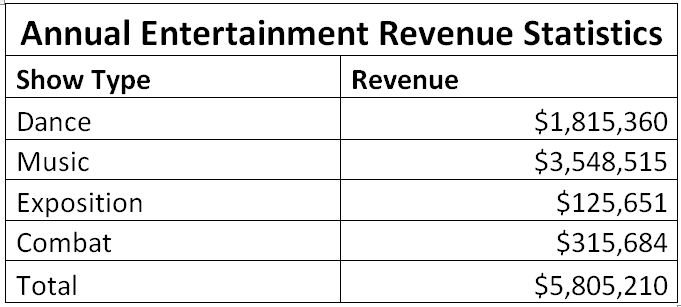
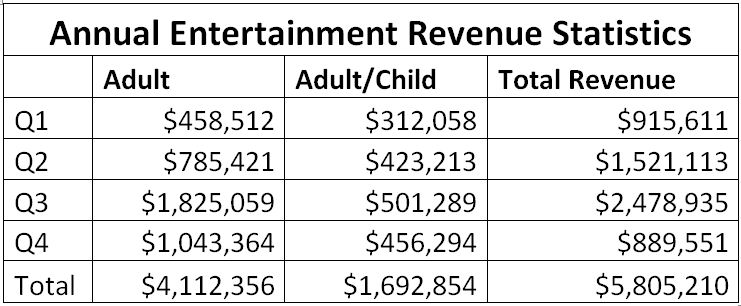
The images below demonstrate how a report can become exponentially more valuable by adding meaningful dimensions. For this example we’ll use the annual entertainment revenue for ticket sales at a local venue:

Traditional Reporting: A single dimension

Single Dimension AnalysisThis type of report gives us basic data for quarterly sales of show tickets.

Single Dimension AnalysisThis one-dimensional report provides insight into the audiences and how much revenue each segment generates.

Single Dimension AnalysisThis reports segments the shows into show types, which provides a bit more insight into which shows are bringing in the highest revenue.

While all three of these reports do have some value, they only provide the information in small portions. This is not the ideal presentation of data that will be analyzed to make marketing decisions. A better option is to use two dimensional reports:

Hybrid Reporting: Two dimensions

Two Dimensional AnalysisWhen we combine the data from tables one, two, and three we create a sort of hybrid table that can provide a more complete picture of the data.

The 3-D View: Multiple dimensions

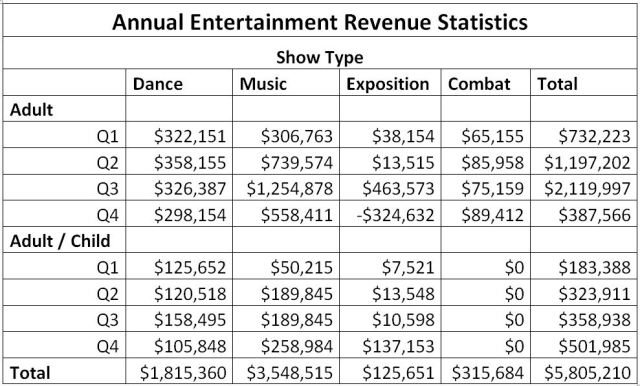
Multidimensional Analysis

This report highlights the capabilities of multidimensional analysis. It presents multipledimensions of data in a clean and easy to read format. An analysis can easily be made to determine which show types and which audiences provide the most revenue in each quarter.

When reports are designed with OLAP using multidimensional techniques your analysts become empowered and their understanding of your company data will present more of a 360 view of activities within your organization.