Dump Your Dead Weight Customers

Most companies spend the majority of their BI and analytical efforts designing marketing campaigns to specifically attract new customers. It is probably less common to look for the dead weight customers that may be responsible for more headaches than profit. With the high costs of marketing and advertising, a smart strategy is to focus on the quality of the customers rather than the quantity.

So how do you spot these dead weight customers? Of course, the type of relevant data that you have depends on your specific industry, but here are a few ideas to get the wheels turning:

Customer Service Calls – A big spender who complains a lot may be costing you more than he is worth. Each minute that your operators spend on customer service calls represent a decreased value in your customer. A good way to get a more accurate value of your customer is to consider both the costs incurred via customer calls as well as the amount that they spend.

Returns/Refunds – Returns will usually always result in the company taking a monetary hit in one way or another. There may be additional restocking fees or shipping and handling fees involved. In addition, returns take time to process which adds additional costs to the transaction. A customer may be a big spender and you may have valuated him as someone you will strive to retain, but it is important to also pay attention to the amount of returns or refunds the customer requests. Use the variables that are specific to your data set and determine the cost that is incurred for a return transaction and use this figure to determine a more accurate value of your customer.

Offer vs. Spending Ratio – Consider the marketing offers that you send out, are they bringing in a high yield? One clothing store that is located in my neighborhood sends me coupons for $10 off of any purchase. They are essentially giving me $10 for free. The goal of this offer is of course to get me in the store at which time I will likely spend five to ten times this amount. If I were to take this $10 coupon each time and spend exactly $10 in the store then the retail outlet would be smart to consider me a dead weight customer and discontinue sending me these offers.

I have presented a very simplistic view to encourage you to consider the different variables that can devalue a customer. It is important to also consider the other non-monetary valuations that can be placed on your customers such as referrals and influence. Just as in the above examples, you can put a value on these variables and continue to build the formula that you will ultimately use to put a true value on your customers.
Data Quality Assurance – Will the Real John Smith Please Stand Up?

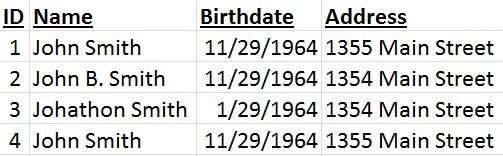
As humans we have the ability to scan multiple segments of data and make logical conclusions about the relationships that records have with each other. As an example, if we see the four records below we can easily conclude that all four records are indeed the same person.

Data Quality Assurance

Data quality assurance is the process of cleansing or scrubbing your data as it is extracted from your source systems and before it is inserted into your data warehouse. The ultimate goal is to remove “dirty” data such as duplicate or incomplete records. Multiple tools can and should be used to ensure that your data warehouse is as accurate and clean as possible.

If you data includes addresses you may choose to cross reference the city or province with the zip code or postal code. Many companies sell databases that include updated address information that can be used as a standard comparison for your address data.

Fuzzy logic can be used to merge duplicated records like the ones that appear in the example above. We can see that records one and four are a 100% match, so these can be easily merged. When comparing records one and two we see that two includes a middle initial and has an address discrepancy.

This is where your business rules will come into play. You may decide to disregard middle initials in your data cleansing process, or you may consider that the name field is one letter off and deduct 5% from the data match. Seeing that the address is one number off may also deduct the match score by another 5%. So the data quality score for records one and two comes to 90%. You will need to set your threshold to determine your business rules for merging two records. If your threshold is at 85% then these two records will be merged.

Now the question is to consider which record has the accurate data. This example is relatively simplistic because we do have two identical records. It is probably safe to say that the two 100% matching records have the most valid data. We can also look to see that the same birthday appears three out of four times, so we can safely conclude that the correct birthdate is 11/29/1964.

Data quality assurance is one of the most important things that will be used to construct your data warehouse and you shouldn’t underestimate the importance of investing both time and money into this portion of developing your business intelligence solution.

Protect Your Users: Say NO to Information Overload

Say No to Information Overload, Business IntelligenceAs a person driven by the joy of dealing with massive amounts of data, you can likely view tons of data without feeling overwhelmed. But, when designing BI dashboards remember, most users aren’t like you. I’m not saying this is a bad thing, what would the world be like if it were filled with data geeks? -Eeek. To help users make sense of the massive amount of data that you will be displaying I recommend organizing a single page dashboard with data organized into meaningful groups.

If more information is needed you can hyperlink each group title and present the user with a fresh one-page view that is specific to the particular group. Too many graphs, charts, and KPIs will simply begin to blur and the user may actually feel less informed after becoming overwhelmed with too much data.

In addition, I recommend paying attention to the level of detail that is displayed on your dashboards. If your user’s home dashboard is littered with detailed information they may end up spending a lot of time trying to figure out which data sets are relevant to their questions. Save the home dashboard for summary data that allows the user to drill down into more detail if needed.

You may also want to consider what level of detail to display when the user does wish to drill down on a report. I have found that allowing for three layers of drill down display provides a good balance. The user can navigate from summary, to aggregated, to individual record detail at will.

One final point I would like to make when considering the potential for information overload is to thoughtfully organize your user’s dashboards. Rather than simply squeezing in charts wherever they will fit engineer your dashboards to help the user find the most vital information easily. Most users’ eyes will naturally begin reading at the upper left hand corner of the screen, so naturally it would be a good idea to place their most coveted information in this area. Other less relevant data should be placed at the lower left hand corner of the screen, while keeping in mind the importance of arranging data in a meaningful way that allows the user’s mind to easily move from topic to topic.

Best of luck in your dashboard creation ventures! I hope this has added value for you.

How to Market Your BI Tools Internally

If you’re in the middle of implementing your business intelligence solution and you haven’t yet considered user adoption strategies, it’s time to start thinking about it. We usually think of the term “marketing” to mean collecting data about our customers to find methods that will increase sales.

 In this scenario replace the word “customers” with the word “users”, and replace the word “sales” with the words “user adoption”. It’s time to learn about your users so that you can effectively promote your new business intelligence solution to increase user adoption.

When we market we learn about our customers/users through effective communication. This is accomplished by marketing campaigns, or in this scenario a communication strategy. As hard as it may be for you admit, your BI tools may not be meant for every user. Communicate with your users to learn about their needs and how they currently accomplish their daily tasks. Here are some questions to help determine a user’s needs:

  • Will the user need to compare historical data?
  • Does the user run the same reports on scheduled days/times?
  • Is the user an analyst who will need to see the data in more detail?
  • Is the user only interested in summarized data?

Once you have communicated with your users and collected information about their needs you can begin to access how the BI tool can help to make their jobs easier and more efficient.

The need for communication continues by establishing a training plan for your users. I recommend training each user on the portion of the BI tool that will benefit them the most and the fastest. If you can spend five minutes to show a user how his report can now be updated automatically and save him three hours a week he will see the instant value in the new BI solution.

This could be compared with the phrase “go for the quick win”. Creating instant value for your users will win them over and make them curious about what else the BI tools can do for them. To accomplish this training is essential. Don’t promise your users that the tool can do what they need, but leave them to figure it out for them. They will easily become frustrated and revert back to their old methods that work well enough for them.


Job satisfaction in the Business Intelligence World

The ability to help improve people’s lives and job satisfaction through process improvement is what drew me into the IT industry. Many people, even in large established businesses, are drowning in tedious work tasks that could be simplified through automation. Many small business owners have found a way to survive a harsh economic environment by improving their internal efficiency and automating manual tasks.

My job satisfaction is derived directly from improving the lives of others by streamlining processes. Administering business intelligence software continues to provide this satisfaction but on a much larger scale. Automating small task for individuals will help the individual and the department that the individual belongs to, but implementing a business intelligence solution can potentially restructure the way an entire corporation communicates and collaborates.

A business intelligence solution will automate the reporting processes across all departments. Interactive dashboards can display real-time data, and visual comparative statistics will enable department heads to quickly analyze data and make effective decisions. The days of manual entry and manual uploads through spreadsheets are long gone. When implemented effectively your BI solution will eliminate manual reporting and paper usage in general.

Reducing paper circulation is great, but the real value comes from the nearly instant delivery of valuable company data. Entry level positions will no longer be summing columns and emailing spreadsheets. New employees will be able to hit the ground running by having data available at their fingertips. Analysis can begin at the lowest level and value creation will result from this.

When your job matters and you know that you are adding value to your company, you are more likely to experience a high level of job satisfaction. I feel (and hope) that the majority of people desire to learn new things. A BI solution requires continual learning, and offers individuals the ability to uncover valuable trends by thinking outside of the box. Participating in this type of environment, and supporting the tools allows me to feel that I am making a difference in people’s jobs and lives.


Parallel adoption

A new business intelligence solution can potentially replace all of the historical data mining, analysis, and reporting methods that are used in your organization. Many users will adopt the new BI solution and abandon the old querying methods seamlessly. Other users will need some transition time. They might need to learn the new BI software and the new data warehouse while still producing reports. This learning period will require a parallel adoption where your old data warehouse and your new data warehouse continue to be maintained.

For the IT department this means an increased workload while the old data warehouse is being phased out. The timeline for this varies depending on the amount of data that you handle and the size of your organization. During this period I recommend establishing some “ground rules” for how you plan to proceed. You will need to take the users’ needs into consideration while also managing your workload.

Here are some suggested techniques or “ground rules” for parallel adoption.

  • Continue to maintain the old data warehouse but do not make new additions or enhancements to it.
  • Begin migrating reports from the old database to utilize the new BI solution.
  • Set a tentative date to officially discontinue the maintenance of your old data warehouse.

Be sure that your users understand your parallel adoption plan, and the reasons behind your decisions.  They will need to take part in this process by reproducing their current reports using the new system.


Managing Your BI Security Using Active Directory

The details of security settings in end user BI applications will likely vary greatly depending on the specific software that you are using. However, the basic concepts of managing the security and the design of the security structures will probably mirror other common security settings.

Users will be created and will be assigned specific roles. Each role allows for different functions within the application. Each user will be assigned to a group. Each group has specific access permissions. When your developers build dashboards, they will be published for specific groups and for specific individuals. All of these security settings can be managed directly in the BI software.

Before jumping into the design of your new business intelligence security settings you should consider what other types of security management tools that your organization currently uses. Your BI software may offer you the opportunity to manage your security via your current Active Directory structure. Choosing this option has some initial negatives, but some long-term advantages.

Short-term negatives:

  • Your folder structure in your Active Directory will need to mirror your folder structure in your BI software.
  • New users will have to be grouped in AD, just as they would otherwise need to be grouped in your BI software.
  • A lot of communication between developers, analysts, and network admins will be necessary to determine the proper group assignment for individuals.
  • Setting up AD security will be just as, if not more, time consuming as setting up BI software security.

Long-term positives:

  • Employee turnover maintenance is simplified. When an employee leaves the company the network admin will simply disable the AD account (which is necessary even without the BI solution) and you will not have to disable the individual user in your BI solution.
  • New employees can easily adopt the security settings of old employees. When an employee is replaced there is no need to re-create the entire security settings. When you use AD security you can simply copy the security profile of the old employee and assign it to the new hire.
  • AD security offers a more extensible solution. Managing a dozen or so users in your BI software security may be simple, but when the user base grows to include hundreds of users AD security will be better equipped to define a user and his or her access levels.

For me, I feel that the long-term positives outweigh the short-term negatives when considering integrating your BI security with your AD security. The important thing to remember is that once you decide how to handle your BI security, the design will be very difficult to undo. Carefully thinking through the implications of your decision now will save you a lot of time and effort in the future.

BI Implementation: Preparing for Phase 2

In my previous post “BI: The Project That Never Ends”  I discussed the ongoing process improvement cycle that should be anticipated after implementing a new business intelligence solution. Once users and analysts are presented with their new data warehouse and BI application tools they will have multiple requests for new data. Some of these requests can be easily implemented as part of the ongoing process improvement cycle, but others should be grouped into a future “Phase 2” implementation.

As an example, an initial BI release may have included the merging of two of the most valuable source systems that allows for a 360° view of your customers. Analysts may quickly realize that there is data in other source systems that will provide even more insight into customer activity. A labor analyst may see the value in bringing in labor data that can be directly compared to levels of customer spending. Bringing in additional source systems is a completely new project that should not be attempted “on the fly”. Requests like these will be grouped into Phase 2 of your BI implementation.

There may be modules that were available add-ons for your business intelligence software, but your company chose not to include them in the Phase 1 portion of your BI solution. Adding new modules and integrating them with your BI solution will also be grouped as a new project and should be included in your Phase 2 portion of your BI implementation.

Other tasks, such as pulling in a table from your current integrated systems can be done relatively quickly. Smaller requests like these should be part of your on-going daily process improvement tasks. As users send in multiple requests it will be beneficial to manage their expectations by informing them if their request falls under the Phase 2 plans, or if they can expect to see the data relatively soon.

BI: The Project that Never Ends

If you are like me, you probably started your business intelligence project with a time line that included a hypothetical “beginning” and “end” date. About a day after the initial launch of our BI solution I quickly realized that there really is no “end” to this project. Many typical IT projects will end with the team members all breathing a sigh of relief, but for your BI project…don’t hold your breath waiting on this “post-project break”.

Your business intelligence solution is only a jumpstart to foster an environment of continual process improvement, with continual being the key word here. A successful BI implementation will merge multiple source systems and provide your analysts with mountains of new data. With merged records the analysts will be able to view the data in new ways and make inferences that they were previously not able to make. These new insights will define areas in your business where processes can be improved which will translate into changing business processes.

When new business processes emerge a chain link reaction is triggered. New processes will ultimately result in new types of data being generated. This may come from new data fields being populated in existing systems, different measures and aggregations that are used to define business terms, or even in the form of a completely new source system. Each new piece of data will now need to be extracted from the source system, transformed into meaningful dimensions and measures, and loaded into the data warehouse. The data will then need to be linked to your BI software so that users can access the data and use it to generate meaningful reports. This cycle is never-ending, and encouraging this type of continuous process improvement will greatly increase the likelihood that you will get your expected ROI from your business intelligence solution.

Spreadmarts: The Spreadsheet Debate

The term spreadmarts was coined by Wayne Eckerson in 2002. The term refers to the partial sets of data that accumulate when users export data from their BI solution into a spreadsheet.

How do spreadsheets fit in with your BI solution? This is a topic that is highly debatable. People in organizations have become so accustomed to putting data into a spreadsheet and manipulating the data before sending it off to VPs and executives to make important company decisions. The biggest danger here is that the data in spreadsheets is not linked to current data. The figures may be outdated before they even reach the desks of decision makers, causing errors in decision making. Each individual that generates a spreadsheet usually has different rules and formulas that are used to aggregate data, so when errors arise deciphering the meaning of the data can become costly and time consuming.

What’s the solution? Most BI solutions provide users with the capability of rendering data in a format that is user friendly while still being connected to the data warehouse. Users will typically shy away from using the BI solution because they are more familiar with Excel spreadsheets and they feel comfortable with the tool. In order to encourage user adoption you will first need to understand the concerns that the users have by questioning them using non-threating terminology. You will be able to slowly increase user adoption rates by explaining and demonstrating some of the benefits that a BI solution has over Excel spreadsheets. In short, show the users how the BI solution can make their jobs easier. Something as simple as report auto-generation and scheduling will save the user time. Demonstrate that BI reports have the same, and more capabilities as spreadsheets. Another strong point to reference is that “homemade” spreadsheets can’t be supported by IT and they usually die when the creator of the report leaves the company. Reports generated through a BI solution are supported by IT and they can easily be transferred to different users.